
What this integration does
GSA eBuy sends private requests for quotes (RFQs) to contractors on GSA schedules. SamSearch gives your organization a dedicated inbound email address; once you add that address as a POC in eBuy and SamSearch finishes activating the connection, those RFQs appear on the Search page under the GSA eBuy source.GSA eBuy is not searchable the way other sources are — there’s no keyword box for it. Every RFQ your organization is eligible for is surfaced automatically. eBuy opportunities also can’t be dismissed, unlike other sources.
Part 1 — Start in SamSearch
1
Open Integrations
In the left sidebar, scroll to Account and click Integrations.
2
Find GSA eBuy
Scroll to the Government Sources section. Click Start Setup on the GSA eBuy card.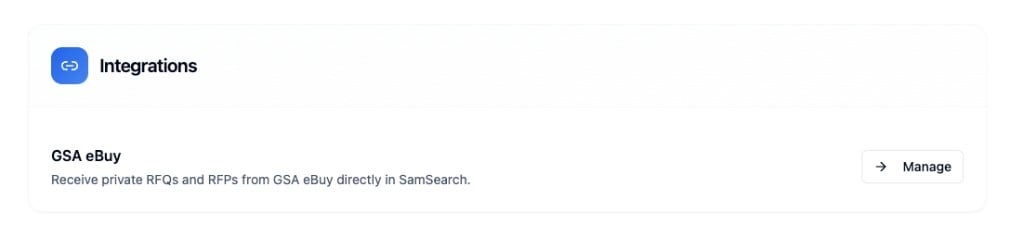
3
Copy your dedicated eBuy address
SamSearch generates a unique inbound address for your organization, in the form 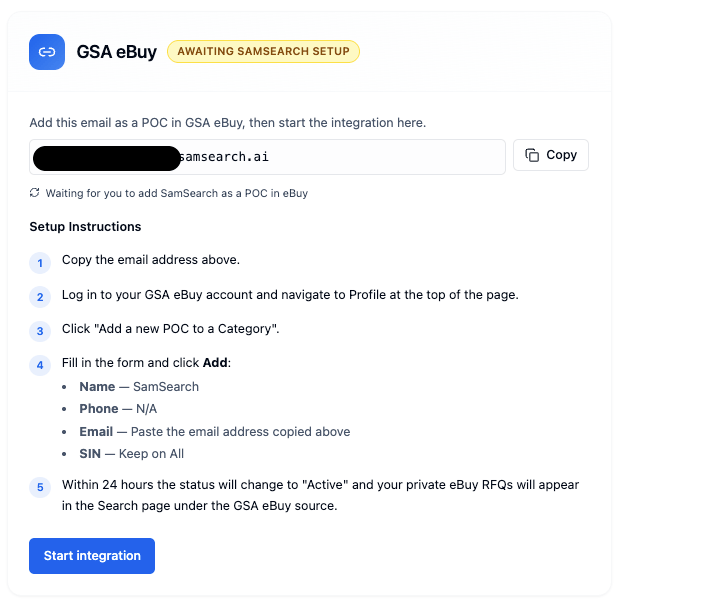
{token}@ebuy.samsearch.ai. Click Copy next to it — you’ll paste it into GSA eBuy in Part 2.Part 2 — Add SamSearch as a POC in GSA eBuy
Step 1 — Log in to GSA eBuy Go to ebuy.gsa.gov and sign in with your GSA credentials. Step 2 — Open your Profile Click the Profile tab in the top navigation..png?fit=max&auto=format&n=0Q_wEPN9PhIuTTZN&q=85&s=340d8927358a03f0754b404c7f35c405)
.png?fit=max&auto=format&n=0Q_wEPN9PhIuTTZN&q=85&s=a609f992204678a8e25f98dfbe8f0fcf)
Click Add to save.
Part 3 — Confirm and activate
1
Confirm in SamSearch
Return to Account → Integrations → GSA eBuy and click I’ve added SamSearch as a POC →.
2
Awaiting SamSearch setup
Your card now shows Awaiting SamSearch setup. Confirming notifies the SamSearch team internally — activation is completed by SamSearch staff, not an automated check, so it isn’t instant.
3
Active
Status updates to Active — usually within 24 hours. If you check the Search page before then, the empty state reads: “Your integration is still activating. Opportunities usually appear within 24 hours after the GSA eBuy POC is set.”
You can be listed as a POC on multiple contract vehicles. When you are, the GSA eBuy card shows a Contracts / vehicles count, and RFQs from all of them sync into SamSearch.
Status reference
Troubleshooting
Status stays on “Awaiting SamSearch setup” past 24 hours- Confirm you pasted the dedicated address from SamSearch (not a generic or support address) into the eBuy POC form.
- Confirm you clicked I’ve added SamSearch as a POC → in SamSearch after adding it in eBuy.
- Still stuck after 24 hours? Contact support — activation is completed manually and can occasionally run past the usual window.
- Check that integration status is Active in Account → Integrations.
- Select the GSA eBuy source on the Search page.
- Remember eBuy has no keyword search — if a category truly has no open RFQs for your SINs right now, the source will be empty.