
It only runs on scheduled alerts, not on manual runs
In the product this is spelled out directly: the Run Search button’s tooltip reads “Runs the raw search and shows every match right now. AI qualification only runs on the scheduled email alerts — not on manual runs,” and the button itself carries a Skips AI qualification caption whenever qualification is turned on.Turning it on
AI Qualification is configured per saved search, from the same dialog where you set up email alerts.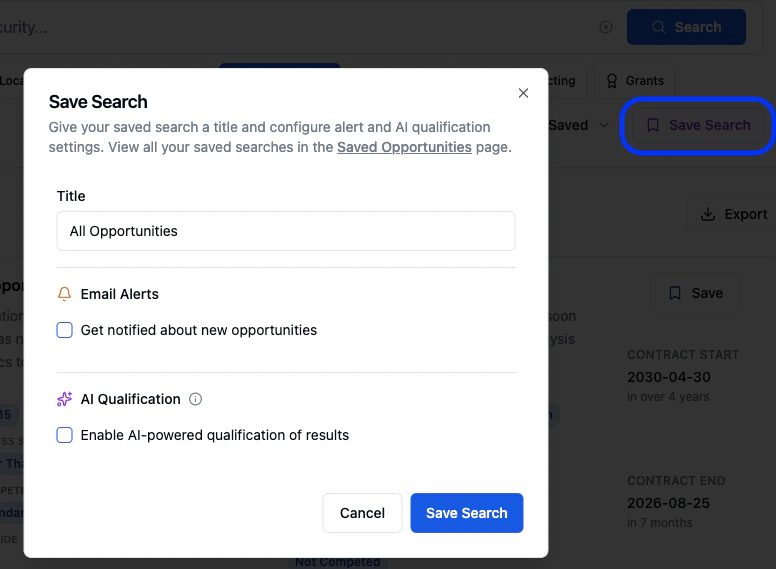
1
Save or open a search
Run a search and click Save Search, or open an existing entry on the Saved & History page.
2
Turn on Email Alerts
AI Qualification only takes effect on the scheduled alert, so alerts need to be on too. Choose Daily, Weekly, or Monthly.
3
Enable AI Qualification
Check Enable AI-powered qualification of results, then choose a mode — Company Profile or Custom Criteria.
4
Save
Click Save Search. The next time this search’s alert runs, results are qualified before they reach you.
Choosing a mode
- Company Profile
- Custom Criteria
Evaluates each result against the same fields that drive AI Recommendations — NAICS/PSC codes, positive/negative keywords, certifications, operating regions, and Deal Makers/Breakers. Use this when the saved search should be judged by the same standard as the rest of your recommendations.
If you don’t own a shared saved search, you’ll see a read-only summary of its qualification settings — mode and criteria — but can’t edit them. Only the owner can change qualification settings on a shared search.
Reading the score
Qualification uses the exact same fit tiers as Recommendations:
For the full mechanics — how the score is built from four weighted dimensions, why a profile needs certain fields filled in before qualification can run at all, and why keyword matching is literal rather than semantic — see How AI Recommendations work. Qualification shares all of it: the same signal gate, the same code-trust rules per source, and the same qualification cache.
Where qualified results show up
Qualified results don’t appear on a separate qualification page — they land on the Recommendations page, under the Saved Searches tab.- Passed → shows up as a normal recommendation card, scored and explained like any other.
- Rejected or scored low → no recommendation is created. If you later open that specific opportunity directly, its contract page shows a banner explaining the decision (“We reviewed this and didn’t recommend it” for a reject, or “We showed this to you, but it scored low” for a low-fit result) instead of a match score.
Only reject and low-fit decisions produce that banner. If a result needed review or couldn’t be evaluated, nothing appears on the contract page at all.
Common questions
I have broad saved searches but I'm only getting a couple of recommendations from them — is that expected?
I have broad saved searches but I'm only getting a couple of recommendations from them — is that expected?
Two things affect this: whether your Company Profile is filled out (qualification in Company Profile mode has less to work with on a thin profile), and whether AI Qualification is actually toggled on for that saved search. A saved search without qualification enabled sends every raw result to your alert — with it enabled, only qualified matches make it through.
Why don't I see a qualification score when I click Run Search?
Why don't I see a qualification score when I click Run Search?
Manual runs skip qualification entirely — see above. Only the scheduled alert qualifies results.
Can I set different criteria for different saved searches?
Can I set different criteria for different saved searches?
Yes — qualification is configured per saved search. One search can use your Company Profile while another uses its own Custom Criteria.
I edited my saved search's alert settings — will qualification still be on?
I edited my saved search's alert settings — will qualification still be on?
Confirm it before saving. Edit mode doesn’t always carry forward every existing alert and qualification setting, so double-check both are still set the way you expect before clicking Update Saved Search.
Next step: Set up the saved search itself, including sharing and alert frequency, on the Saved & History page.