
What Market Watch is
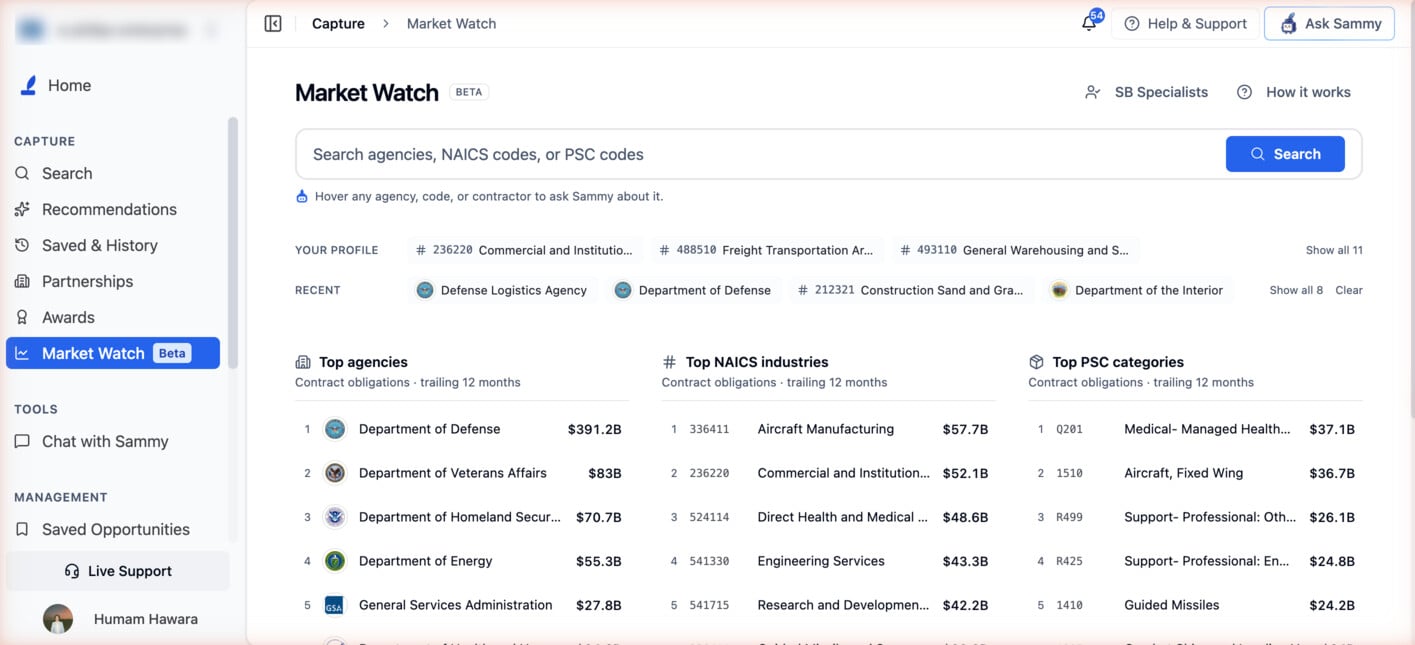
Market Watch is a spend-analytics and navigation hub built on historical, already-obligated federal contract data from USAspending. It is not a predictive tool and does not forecast future spending. Search an agency, a 6-digit NAICS code, or a PSC code and it takes you to that entity’s analytics page: spending over time, top buyers and primes, active contracts, published forecasts, upcoming recompetes, and the people behind them.The “Beta” badge next to the Market Watch title (and on the sidebar item) is a label, not a feature gate. There’s no separate beta programme, waitlist, or limited rollout behind it. Every user who can reach the page sees the same, fully working feature.
The Market Watch sidebar item is shown only on Pro and Enterprise. Like Awards and Partnerships, it requires SLED access. If you don’t see it in the left sidebar, that’s why.The Agency, Sub-Agency, Office, NAICS and PSC pages that Market Watch links into don’t require SLED access. You can still reach them by clicking a NAICS or PSC code on a Federal contract page, for example. Opening full Award Search results or SB Specialists does require SLED access.
The landing page
The page header is a single line: Market Watch with its Beta badge on the left, and two buttons on the right:- SB Specialists opens the Small Business Specialists directory. It has no sidebar item of its own; this button is the way in.
- How it works opens a short popover: a one-line summary, three numbered steps (search, open the analytics, pin and ask Sammy), a note that figures are federal contract obligations from USAspending.gov with the landing page covering the trailing 12 months, and a Show the welcome overview again link.
Searching
A single search bar (placeholder “Search agencies, NAICS codes, or PSC codes”) covers all three kinds of entity at once. Press / anywhere on the page to focus it. Results come back grouped under Agencies, NAICS codes, and PSC codes, so you can see every kind of match side by side.- Agencies is a live lookup that starts after two characters. Each result shows the agency’s seal (or a monogram when there isn’t one). Top-level departments open the Agency page, and sub-agencies are labelled Sub-agency under their parent’s name and open the Sub-Agency page.
- NAICS codes and PSC codes match on the code first, then on the industry or product name.
- Press Enter or click the blue Search button to open the highlighted result, which is the first match by default. Use the arrow keys to move between results. Esc closes the list.
- With nothing typed, the dropdown shows your Recently viewed entities and a Popular agencies shortlist (DOD, VA, DHS, HHS, DOE, NASA, GSA, DOT), plus a hint such as “Try a 6-digit NAICS like 541512, a PSC like D302, or an agency name.”
- Hover any result row to reveal a pin icon.
- Once you’ve typed two or more characters, a Save group at the bottom offers Pin the search ”…”. This pins the query itself, so clicking it later reopens Market Watch with that search already run.
Shortcuts
Under the search bar, up to three one-line rows help you get back to what you track. Each row shows as many chips as fit on one line. When a row has more than three items, a Show all N / Show less toggle expands it.- Pinned: every agency, sub-agency, office, NAICS/PSC code, or saved search you’ve pinned. Hover a chip and click its × to unpin it.
- Your profile: the NAICS and PSC codes on your Company Profile, as one-click links to their analytics pages.
- Recent: the last 8 entities you viewed, with a Clear link.
Pins and recent views are saved in your browser, not your SamSearch account. They don’t follow you to another browser or device, and clearing your browser’s site data removes them. Market Watch keeps up to 24 pins.
Leaderboards
Three side-by-side boards rank the 10 highest entities by contract obligations: Top agencies, Top NAICS industries, and Top PSC categories. Each one is captioned “Contract obligations · trailing 12 months.” Each row shows the rank, the agency seal or code, the name, and the dollar amount. Hovering a row reveals Ask Sammy and Pin, and clicking the row opens that entity’s analytics page. The leaderboard totals count only obligations made within the last 12 months. They don’t include the lifetime value of long-running awards that happened to have activity in that window, so the figures aren’t inflated by old awards.Drilling into an entity
Opening any agency, sub-agency, NAICS code, or PSC code from Market Watch takes you to its analytics page. The breadcrumb leads back to Market Watch. All of these pages share the same layout:- A header with the agency seal (or a code icon), a label such as Federal agency, Sub-agency, NAICS industry, or Product / service code, plus Pin and Ask Sammy buttons.
- An at-a-glance stat strip: Obligated · last 3 FY, the latest complete quarter, and the top NAICS or top buyer, along with the top prime.
- A Spending over time card showing quarterly obligations for the last 3 fiscal years. The current, unfinished quarter appears as a dashed “to date” segment.
- Tabs for Contracts & Opportunities, Spending & Awards, and contacts.
The trailing window is different depending on where you’re looking. Market Watch’s own leaderboards use a trailing 12-month window. Once you open an Agency, Sub-Agency, NAICS, or PSC page, the spending chart there covers the last 3 fiscal years instead. Both are correct. They answer different questions: “what’s hot right now” versus “the multi-year pattern.”
Ask Sammy from Market Watch
Hover any agency, code, or contractor row (or use the Ask Sammy button in an analytics page’s header) to open a short menu of pre-written prompts. Picking one opens Sammy’s chat panel and sends the prompt right away. If none fit, Ask something else… at the bottom opens Sammy so you can type your own.
Some labels adapt to the data. For example, if a recompete has no known incumbent, Profile the incumbent reads Who holds it today instead.
Best Practices
Start From Your Codes
Use the “Your profile” shortcut row to jump straight to the NAICS/PSC codes on your Company Profile instead of browsing broadly.
Pin What You Track
Pin the agencies, sub-agencies, offices and codes you follow, and pin recurring searches, so they’re one click away every time you open Market Watch.
Work the Agency Pipeline
On an agency or sub-agency page, check Recompetes, Forecast and Events & industry days together. They’re your best signals for engaging before a solicitation posts.
Let Sammy Draft the First Touch
Use the Ask Sammy prompts on an agency, office, recompete, or event to get a draft outreach email started, then edit it before sending.
Figures on Market Watch are federal contract obligations sourced from USAspending.gov. Award-level detail (Awards, Award Detail, Subaward Detail) is documented separately at Awards.