
Header
- Opportunity badge
- Solicitation ID and title
- Due Date
Main sections
Smart Summary & AI Description
- Smart Summary — high-level AI overview
- AI Description — structured breakdown, shown only when SamSearch has generated one for this solicitation:
- Solicitation Overview
- Product Specifications
- Packaging and Delivery
- Compliance and Submission
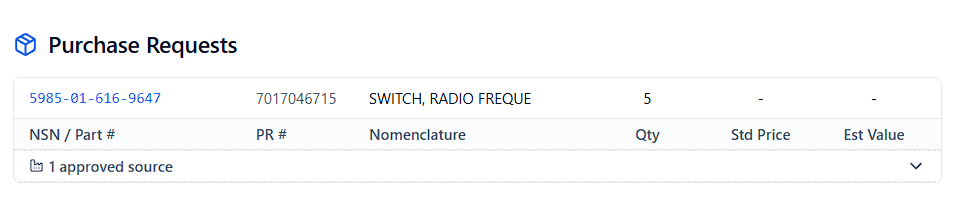
Purchase Requests table
One row per line item on the RFQ:
Expand any row to see:
- Approved Sources — CAGE code (clickable), Part Number, Company for every vendor approved to supply this NSN.
- Specification, Drawing & Standard Data — Type, Document, Ref Qualifier, Amendment Number, Amendment Date, Ref Date. Shows “No basic drawing data available” when DIBBS hasn’t published any.
Procurement History & Pricing Calculator
The Procurement History table lists past awards for this NSN, and a built-in Pricing Calculator sits above it to help you estimate a competitive unit price before you submit on the DIBBS portal:- Row selector — quick buttons for Top 3 / Top 5 / Top 10 / All rows, plus a slider for a custom row count. The calculator only ever looks at rows from the top of the table down — it’s meant to weight recent awards more heavily, not average the entire history evenly.
- Average Unit Cost — a straight average across the selected rows that have unit-cost data.
- Weighted Avg Cost — the same rows, weighted by quantity awarded (so a large-quantity award pulls the number toward its price more than a one-off buy does).
- Observed Price Range — the minimum and maximum price across the selected, priced rows.
- Coverage Window — the newest award date included in your selection, alongside the oldest award date it goes back to — so you can tell at a glance how current (or dated) the pricing data you’re using actually is.
Attachments
PDFs with Summarize, View, and Download per file.Sidebars
Financials: Total Estimated Value (summed across line items), AI Estimated Value badge, Posted Date, Due Date. Key Details: Status, Set Aside, Fast Award (Yes/No — an expedited DLA award process), AIDC (Yes/No — whether Automatic Identification and Data Capture marking is required on this item), Buyer Code. Classification: AI-tagged NAICS code (clickable), and a link out labelled “DIBBS Portal” when a source link is available.Glossary
Back to Contract Overview
Compare all source types.