
Many SLED opportunities require registration on a separate state portal (e.g., JAGGAER, PlanetBids, COMMBUYS, DemandStar) before submitting. SamSearch surfaces the opportunity; submission happens on the state’s own platform.
Badge types
A green Recently Updated badge also appears when the portal’s own last-updated timestamp falls within the past 14 days.
Header
- Badge, ID, Title
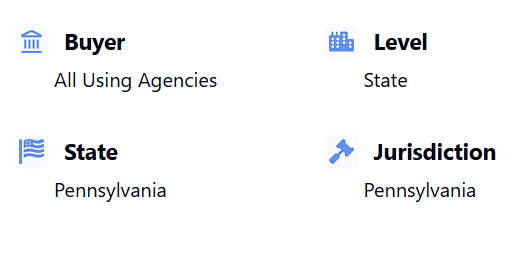
- Buyer, Level (State, City, County, Education, Local), State, Jurisdiction, and Department — Department only shows when the source portal actually reported one
Date fields
SLED pages can show up to six dates — they serve different purposes and don’t all come from the same place:Main sections
Smart Summary and AI-generated fields
AI overview of the opportunity and requirements. Any individual field SamSearch inferred rather than read directly from the portal carries a small AI icon — hover it for “This [field] is generated by SamSearch’s AI.”Description
Parsed from the portal’s own text into labeled rows where possible. Anything already broken out into its own section below (Line Items, Bid Schedule, Events, Vendor lists, Q&A, Categories) is removed from the description to avoid showing it twice.Categories
NIGP/UNSPSC/site commodity codes, shown as a collapsible class-to-item hierarchy when the portal published one.Line Items
Collapsed by default. A real table — item number, code, description, manufacturer, brand, model, unit of measure, quantity, unit price, deliver-to, delivery date, plus any extra columns the source portal included — grouped by the portal’s own Project/Base Bid structure when it has one.Questions & Answers
Asked/answered pairs with their respective dates, when the portal published a Q&A log.Additional Details
A catch-all for anything the portal reported that isn’t already shown somewhere else on the page. If everything the portal sent is already displayed elsewhere, this section doesn’t render at all.Vendor Activity
Grouped by role — Plan Holders List, Document Request List, Prospective Bidders, Suppliers, Contractors, Bid Submitters, Awardees, Followers — whichever the portal actually reports. Each row expands to show address, contact, phone, fax, email, and website when available. Company names link out to a pre-filled Partnerships search. The Document Request List is collapsed by default even when short, since it’s a roster to reference, not something you read top to bottom.Update History
A change log built from content hashing — when SamSearch detects a change to the posting, it lists which fields changed and when. Shows nothing if no changes have been detected.Attachments
ITQ forms, certifications, statements of work, and addenda, grouped into Documents / Addenda / Q&A / Line Items / Communications / Other — Summarize, View, and Download per file. Unlike the other sections on this page, Attachments still appears when the notice has no files — many SLED portals post the notice but hold the bid documents back behind a portal login or send them only on request. In that case the section shows “The source published this opportunity without attachments. We can request the documents from the agency for you.” and a Request documents button.Requesting missing documents
Clicking Request documents opens a Request Documents ticket in SamSearch’s in-app support messenger. The opportunity you’re looking at (title, solicitation ID, agency, state, and a link back to the page) is attached to the request automatically, so you don’t need to explain which notice you mean. On the ticket you choose whether you need missing attachments or a records (FOIA) request, and the SamSearch team takes it from there. The same request flow is offered on Recompete pages with no documents and on every Award detail page, labeled Request records.Nothing is sent to the agency automatically when you click the button — it starts a conversation with the SamSearch team, who make the request on your behalf.
Sidebar
Key Details: Type, Status, Location, Department, Procurement Method, Fiscal Year, AI Product/Service, AI RFX Type, AI NAICS (clickable). Events: Pre-bid meetings and bid openings, each badged Mandatory or Optional, with meeting link/ID/passcode when provided. Requirements: Bid Bond, Payment Bond, Performance Bond, Electronic Bidding — shown as Required/Not required or Allowed/Not allowed, but only for the fields the source actually reported. Contact Information: every contact the portal listed, not limited to a primary/secondary pair.Similar Opportunities
Related SLED solicitations in the same category, shown inline rather than as a tab.Back to Contract Overview
Compare all source types.