
Header
- Badge — the award type (e.g., Delivery Order, IDV, Contract); defaults to “Recompete” when the underlying type isn’t known
- Award ID — the existing/incumbent contract identifier
- Agency (linked), Start/End dates, a highlighted Total Contract Value pill
Smart Summary
Same AI-overview card as every other source, with recompete-specific helper text. Scoring terms are shown in plain English — if you ever see a raw, underscore-separated term on this card or in the score breakdowns, that’s a display bug worth reporting.Contract Details
Also shown: Agency (with description), Sub-Agency, Office, Place of Performance, Award Value, NAICS/PSC (with descriptions), Set-Aside, Business Size, and a timeline of Start Date, End Date, Date Signed, Current Completion, Estimated Ultimate Completion, and Solicitation Date — each only shown when the underlying data has it.
The Award Type field (shown both as the header badge and as a Key Factor in the Contract Readiness breakdown below) reflects whether the incumbent award is a Definitive contract or an Indefinite contract — it doesn’t have a separate fixed tooltip like the fields above.
Agency Forecast Confirmed
When SamSearch has matched this recompete to one or more agency Forecast records, an Agency Forecast Confirmed card appears under Contract Details, captioned “N forecast signal(s) from the agency confirm this recompete.” A forecast is the agency’s own advance procurement plan, so a match is stronger evidence that the contract will actually be re-solicited. Each linked forecast shows its title, agency, NAICS, requirement type, and estimated solicitation date when available, and clicks through to that Forecast page. Matching is automatic: a forecast is linked when it references the same contract number, solicitation ID, or parent vehicle, or when its NAICS, agency, and title/description closely resemble the recompete’s. Forecasts marked as a New Requirement are never linked, since they aren’t re-solicitations. Because the second kind of match is based on similarity, treat a link as a strong signal rather than a guarantee.Parent IDIQ Vehicle & Task Orders
When the incumbent contract is a task order issued under a larger contract vehicle (an IDIQ, GWAC, BPA, or similar), two extra cards can appear:- Parent IDIQ Vehicle — “This task order is issued under the following contract vehicle,” with the vehicle’s title, ID, type, Ceiling, end date, and task-order count. When SamSearch has the parent vehicle as its own recompete record, the card is clickable and opens that record.
- IDIQ Task Orders — the other task orders under the same vehicle, captioned with the total task-order count and combined value. Each row shows the order’s ID, value, and end date and links to its own recompete page. The first five are shown; use Show N more task orders to expand the rest.
Opportunity Scores
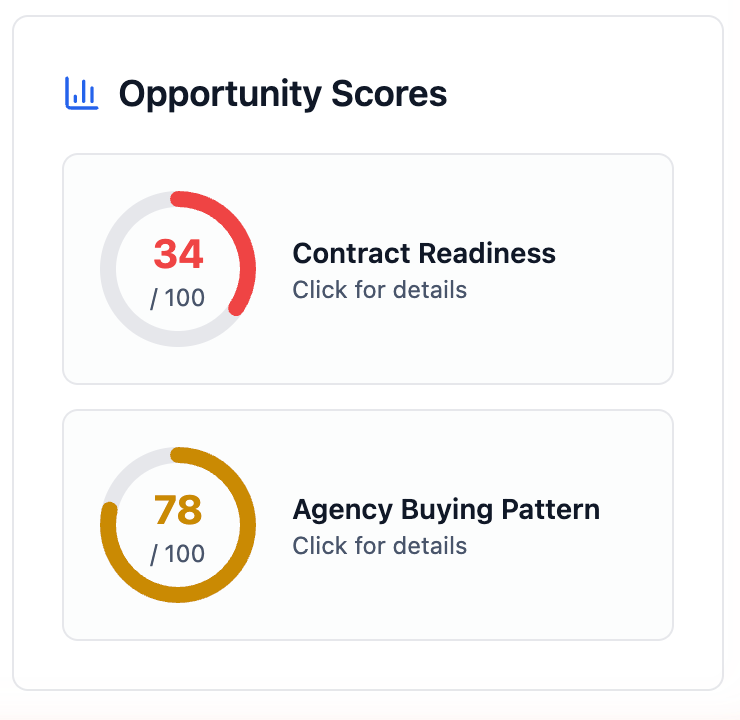
The Opportunity Scores sidebar card shows two gauges, each scored 0–100, to help prioritize your bid/no-bid decision. Both use the same color scale: 80 and above is green, 60–79 is yellow, and anything below 60 is red. Click either gauge (“Click for details”) to jump to its full breakdown further down the page.
The breakdowns below — Key Factors and Historical Patterns — explain the reasoning behind each score.
Contract Readiness — Key Factors
The Recompete Readiness Analysis card repeats the Readiness Score and lists whichever of these Key Factors SamSearch has data for: Time Window, Award Type, Competition, Offers, Service Type, Contract Duration, Extent Competed, and Contract Value.Agency Buying Pattern — Historical Patterns
The Agency Buying Pattern breakdown card’s title adapts to whichever level SamSearch had enough award history to compute at — sub-agency, office, or agency-wide — and is captioned with the number of years and awards behind it (typically a 5-year lookback). Below the gauge, four historical metrics each carry their own plain-language explanation:- Repeat Buying Pattern — how consistently this buyer purchases this product/service category. Higher values read as “Consistently purchases this type of product/service, indicating established recurring need”; lower values read as “Limited history of purchasing this product/service type, may be a new requirement or infrequent need.”
- Competition Rate — how much of this buyer’s spend in the category goes to full competition versus sole source. A low competition rate reads as “easier market entry”; a high one reads as “harder to win.”
- Vendor Turnover — how often the buyer switches vendors for this category. Higher turnover reads as “strong opportunity for new contractors”; lower turnover reads as “incumbents typically retain contracts.”
- Duration Match — whether this contract’s length lines up with the buyer’s typical contract durations for this category.
Incumbent Contractor & Award
- Incumbent Award links through to the full award record for the existing contract.
- Contact Information shows the SAM.gov point of contact for the contract when one is available. When there isn’t one, the card reads “No contact information available” with the hint “Contact details may appear once a solicitation is posted.”
- SAM.gov Award shows Award Prepared By / Award Approved By when SAM.gov reported them. When SAM.gov also reported an email for that person, the name itself is a clickable email link.
Opportunity Timeline
Every SAM.gov notice linked to this recompete — Presolicitation, Solicitation, Award, and so on — plotted oldest to newest. Each point links to that notice’s own Federal contract page.Awarding Office Contacts
Contracting-office contacts for the awarding office, independent of the SAM.gov point-of-contact lookup above. Shows the first two by default with an option to reveal the rest.Attachments & Subawards
Attachments are pulled from whichever linked SAM.gov notice actually has them, checked in this order: Solicitation → Presolicitation → Award → Justification → the first notice in the chain that has any files at all. Each file supports Summarize, View, and Download like any other attachment. If none of the linked notices have any files, the Attachments section still appears with a Request records button and the note “No documents were published with this opportunity. We can request them from the agency, or file a records request for the incumbent contract.” Clicking it opens a Request Documents ticket in the in-app support messenger, with this recompete’s details already attached, so the SamSearch team can go after the documents for you. On the ticket you choose whether you need missing attachments or a records (FOIA) request — for a recompete, the ask is usually the incumbent’s contract. See Requesting missing documents for how the request works. Subawards appear below the contract details when the incumbent award has any on record, linking out to each subaward’s own detail page.Glossary
Back to Contract Overview
Compare all source types.