> ## Documentation Index
> Fetch the complete documentation index at: https://docs.samsearch.co/llms.txt
> Use this file to discover all available pages before exploring further.
# Sammy: Your AI Assistant
> Your intelligent AI assistant for finding, analyzing, and winning government contracts
 Sammy is an intelligent AI assistant built into SamSearch to help you find, analyze, and win government contracts. Whether you're researching opportunities, breaking down complex requirements, or writing proposals, Sammy is available exactly where you need it—providing real-time guidance through natural conversation.
## What is Sammy?
Think of Sammy as a research partner, compliance expert, and proposal coach combined. If you're new to AI tools, you can use Sammy just like you'd ask a colleague a question. Type naturally, and Sammy will understand what you need.
### How Sammy Works
Sammy learns from the documents and context around you. When you're analyzing an RFP, Sammy can reference specific pages and requirements. When you're writing a proposal, Sammy can see the text you're working on. When you're searching broadly, Sammy remembers what you've discussed.
This context awareness means Sammy's answers get better and more relevant as you use it.
## Three Ways to Use Sammy
Extract requirements, identify compliance needs, and verify your company's fit against RFP criteria
Get real-time feedback, improve clarity, and strengthen your proposal content with AI assistance
Find opportunities, understand regulations, and get answers to government contracting questions
## Analyze Opportunities
Sammy is an intelligent AI assistant built into SamSearch to help you find, analyze, and win government contracts. Whether you're researching opportunities, breaking down complex requirements, or writing proposals, Sammy is available exactly where you need it—providing real-time guidance through natural conversation.
## What is Sammy?
Think of Sammy as a research partner, compliance expert, and proposal coach combined. If you're new to AI tools, you can use Sammy just like you'd ask a colleague a question. Type naturally, and Sammy will understand what you need.
### How Sammy Works
Sammy learns from the documents and context around you. When you're analyzing an RFP, Sammy can reference specific pages and requirements. When you're writing a proposal, Sammy can see the text you're working on. When you're searching broadly, Sammy remembers what you've discussed.
This context awareness means Sammy's answers get better and more relevant as you use it.
## Three Ways to Use Sammy
Extract requirements, identify compliance needs, and verify your company's fit against RFP criteria
Get real-time feedback, improve clarity, and strengthen your proposal content with AI assistance
Find opportunities, understand regulations, and get answers to government contracting questions
## Analyze Opportunities
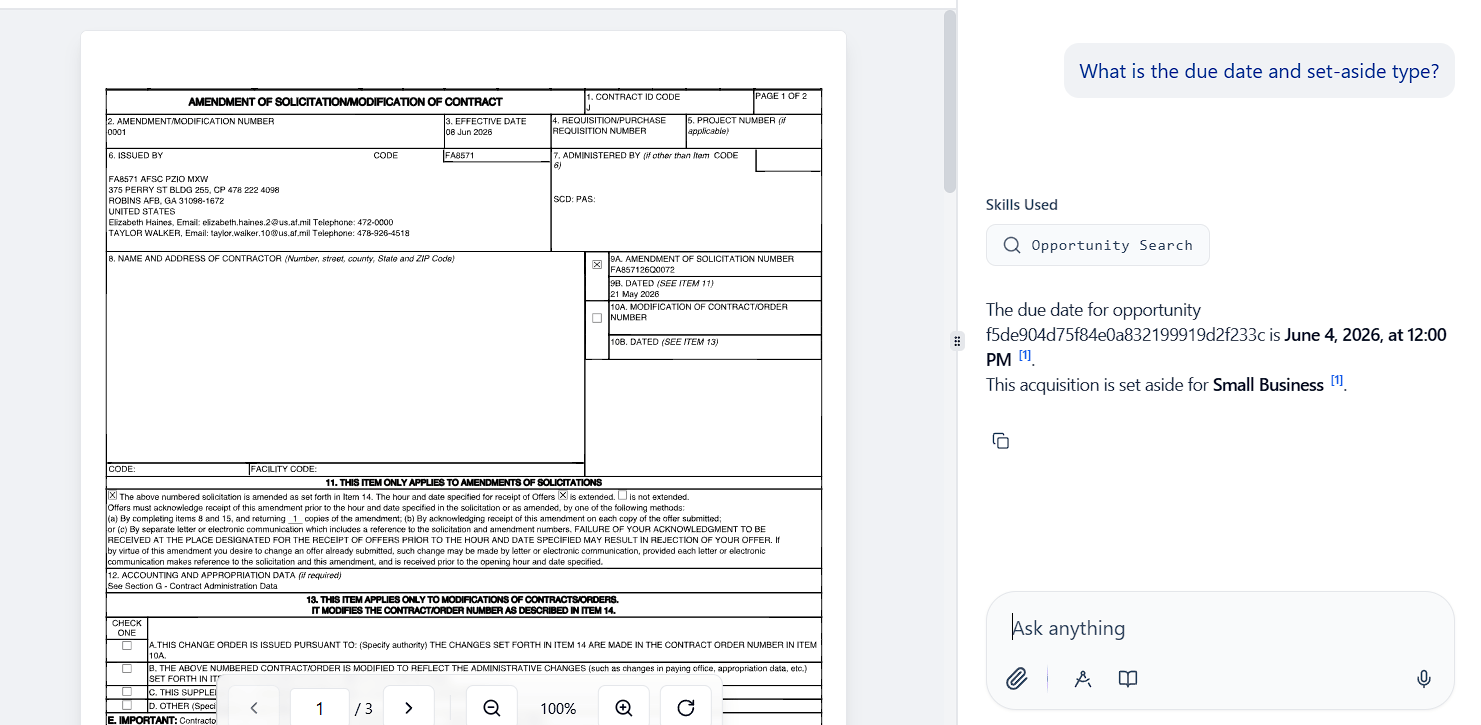 **Where:** In any opportunity with attachments, click the chat icon to start an analysis session.
### What you can do
Key requirements, deadlines, and evaluation criteria
Certifications, clearances, and past performance standards
Technical specifications and deliverables
Your company's match against stated requirements
Government contracting terminology explained
Multiple sections with source document viewing
### How it works
Open an opportunity and click the chat icon
Ask specific questions like "What are the evaluation criteria?" or "Do we need a security clearance?"
Sammy references the RFP and shows you exactly where in the document the answer comes from
Click any source to view it highlighted in the document viewer
Create multiple chat sessions to organize different aspects (compliance, technical specs, past performance)
### Example questions
What are the key technical requirements for this contract?
What past performance or certifications do we need?
What's the contract value and performance timeline?
Is this set aside for small businesses, women-owned businesses, or other categories?
What are the evaluation factors, and how is scoring weighted?
***
## Write Proposals
**Where:** In any opportunity with attachments, click the chat icon to start an analysis session.
### What you can do
Key requirements, deadlines, and evaluation criteria
Certifications, clearances, and past performance standards
Technical specifications and deliverables
Your company's match against stated requirements
Government contracting terminology explained
Multiple sections with source document viewing
### How it works
Open an opportunity and click the chat icon
Ask specific questions like "What are the evaluation criteria?" or "Do we need a security clearance?"
Sammy references the RFP and shows you exactly where in the document the answer comes from
Click any source to view it highlighted in the document viewer
Create multiple chat sessions to organize different aspects (compliance, technical specs, past performance)
### Example questions
What are the key technical requirements for this contract?
What past performance or certifications do we need?
What's the contract value and performance timeline?
Is this set aside for small businesses, women-owned businesses, or other categories?
What are the evaluation factors, and how is scoring weighted?
***
## Write Proposals
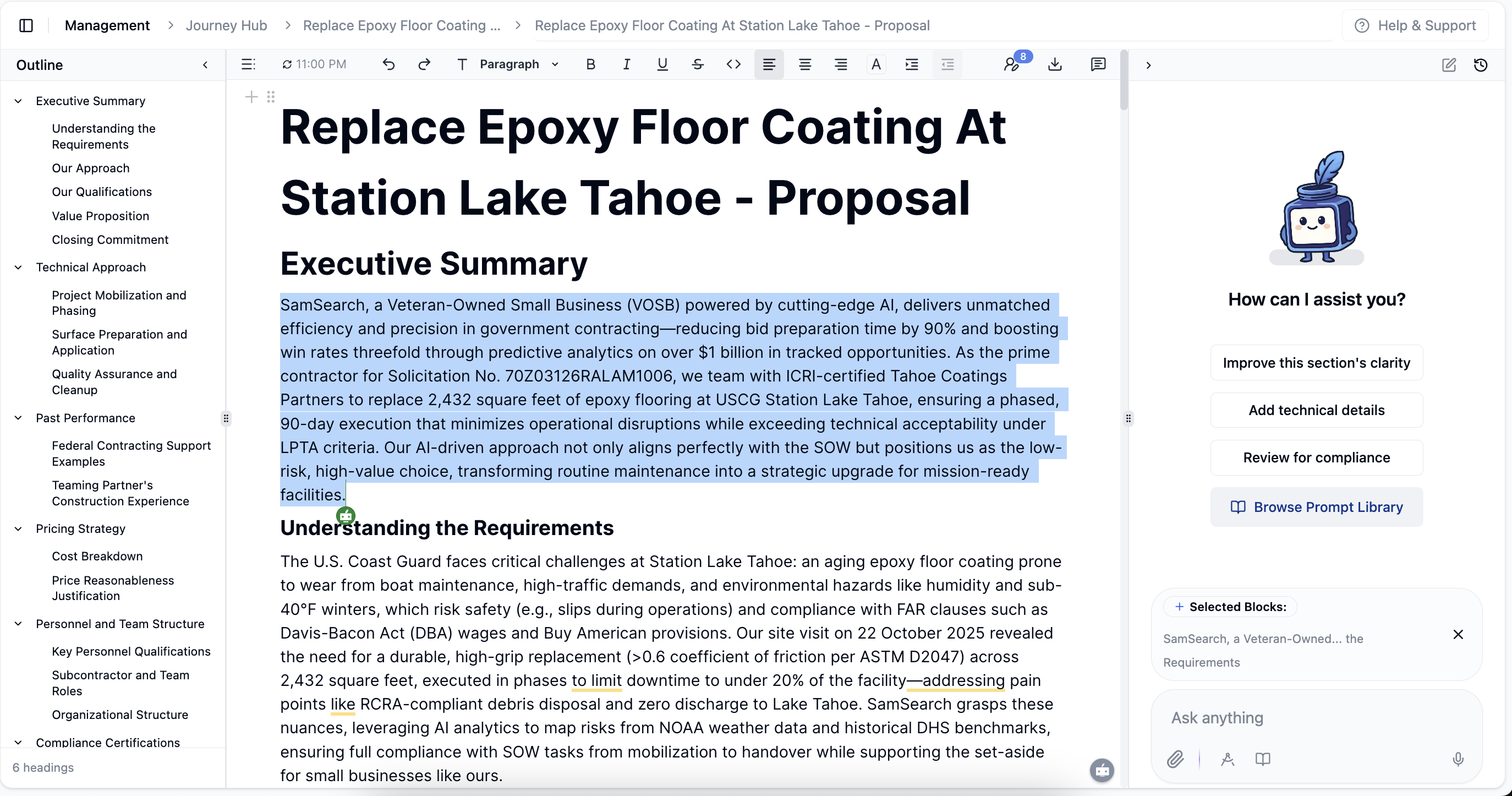 **Where:** In the proposal editor, highlight any text and ask Sammy for help.
### What you can do
Enhance clarity and impact of your content
Include technical details or specific examples
Verify alignment with RFP requirements
Enhance your qualifications section
Check tone, structure, and style
Receive content recommendations
### How it works
Highlight any portion of your proposal
Ask for help: "Make this stronger," "Add more technical detail," or "Does this address the requirement?"
Review Sammy's suggestions
Choose to copy, insert below, or replace your selected text
Continue the conversation to perfect your content
### Example interactions
Highlight your technical approach and ask: "Does this clearly explain our methodology?"
Ask: "What specific metrics should we include for system performance?"
Request: "Strengthen this section to better address the evaluation criteria"
Query: "Is our past performance example relevant to this requirement?"
***
## Research and Answers
**Where:** In the proposal editor, highlight any text and ask Sammy for help.
### What you can do
Enhance clarity and impact of your content
Include technical details or specific examples
Verify alignment with RFP requirements
Enhance your qualifications section
Check tone, structure, and style
Receive content recommendations
### How it works
Highlight any portion of your proposal
Ask for help: "Make this stronger," "Add more technical detail," or "Does this address the requirement?"
Review Sammy's suggestions
Choose to copy, insert below, or replace your selected text
Continue the conversation to perfect your content
### Example interactions
Highlight your technical approach and ask: "Does this clearly explain our methodology?"
Ask: "What specific metrics should we include for system performance?"
Request: "Strengthen this section to better address the evaluation criteria"
Query: "Is our past performance example relevant to this requirement?"
***
## Research and Answers
 **Where:** Access Sammy from the main navigation under "Tools" for general questions.
### What you can do
Match opportunities to your capabilities and size
Research contract patterns and trends
Learn government contracting concepts
Get guidance on set-asides and programs
Learn about codes and compliance standards
Analyze your competitive landscape
## Managing Your Memories
Sammy remembers key facts and preferences about you and your business to provide more personalized and relevant help. You can view and manage these memories in the Memories tab of your Company Profile.
### Update or Change Your Memory
You can ask Sammy to update, correct, or forget any information it knows about you. Just type your request in the chat, for example:
* "Forget my old address and use 123 Main St, Springfield."
* "Update my business focus to cybersecurity and cloud services."
* "Remove my previous NAICS code."
Sammy will confirm the change and update its memory accordingly. For a full list of what Sammy knows, visit the Memories tab.
### How it works
Start a new chat or continue an existing conversation
Ask questions naturally
Use follow-up questions to dig deeper
Save important insights by creating new sessions for different topics
### Example questions
What IT service contracts has the Department of Defense awarded in the last 6 months?
I'm a woman-owned small business in cybersecurity. What opportunities should I focus on?
What does FAR 36.204 mean, and how does it affect our proposal?
How do set-asides work for 8(a) certified companies?
What are common evaluation factors for IT contracts?
***
## Tips for Getting the Best Results
**Instead of:** "Tell me about this opportunity"
**Try:** "What are the compliance requirements and past performance standards?"
**Example:** "We're a small business with 5 years in cybersecurity. How well do we match this contract's requirements?"
Start with: "What are the key requirements?"
Then follow up: "Do we have experience with those technologies?"
When Sammy references a document, click the source to see it highlighted. Always verify important information.
Create separate sessions for technical requirements, compliance review, and past performance analysis.
Ask Sammy like you'd ask a colleague: "Help me understand this requirement" or "What's missing from this section?"
## Key Features
Sammy remembers your conversations, company profile, and the documents you're analyzing for more relevant, personalized help
Every answer references specific pages and sections. Click any source to verify in the document viewer
Organize your analysis by creating separate sessions for different topics
Use the microphone icon to dictate messages hands-free for natural conversation
Browse 100+ expert prompts for opportunity analysis, proposal writing, market research, and compliance checking
While Sammy is powerful, always verify important information against source documents. Apply your professional judgment, especially for compliance and legal requirements. When in doubt, consult with your legal team or the contracting officer.
## Frequently Asked Questions
Sammy is designed to help you research and analyze, but it's not a substitute for careful document review. Always verify critical information against the actual RFP or government source. For legal or compliance questions, consult appropriate experts.
Sammy learns about your company from your SamSearch profile and from context you provide in conversations. The more information you share, the better Sammy can match opportunities and evaluate fit.
Sammy is a research and analysis tool. For compliance-critical decisions—especially around regulations, certifications, or legal requirements—always consult with your internal experts or legal counsel. Use Sammy to gather information and draft initial analysis, but don't treat it as authoritative legal or compliance guidance.
Your personal chats are private to your account. When you create chat sessions within an opportunity, those are saved within that journey for your team to reference later.
Yes. Chat sessions are managed within each opportunity or journey. You can create new sessions, and older conversations can be archived or removed as needed.
Just clarify. You can rephrase, provide more context, or ask a follow-up question. Sammy learns from the conversation, so it will adjust its responses.
No. Use Sammy as much as you need. The more you engage, the better it becomes at helping you.
If a response isn't helpful, let Sammy know directly in the chat. You can also report issues through Help & Support.
Yes. Sammy can help you research market rates, understand cost structures, and think through pricing strategy. However, pricing decisions should always align with your business model and internal finance review.
Contact Help & Support. There may be features or workarounds available, or the SamSearch team can help you find another solution.
**Where:** Access Sammy from the main navigation under "Tools" for general questions.
### What you can do
Match opportunities to your capabilities and size
Research contract patterns and trends
Learn government contracting concepts
Get guidance on set-asides and programs
Learn about codes and compliance standards
Analyze your competitive landscape
## Managing Your Memories
Sammy remembers key facts and preferences about you and your business to provide more personalized and relevant help. You can view and manage these memories in the Memories tab of your Company Profile.
### Update or Change Your Memory
You can ask Sammy to update, correct, or forget any information it knows about you. Just type your request in the chat, for example:
* "Forget my old address and use 123 Main St, Springfield."
* "Update my business focus to cybersecurity and cloud services."
* "Remove my previous NAICS code."
Sammy will confirm the change and update its memory accordingly. For a full list of what Sammy knows, visit the Memories tab.
### How it works
Start a new chat or continue an existing conversation
Ask questions naturally
Use follow-up questions to dig deeper
Save important insights by creating new sessions for different topics
### Example questions
What IT service contracts has the Department of Defense awarded in the last 6 months?
I'm a woman-owned small business in cybersecurity. What opportunities should I focus on?
What does FAR 36.204 mean, and how does it affect our proposal?
How do set-asides work for 8(a) certified companies?
What are common evaluation factors for IT contracts?
***
## Tips for Getting the Best Results
**Instead of:** "Tell me about this opportunity"
**Try:** "What are the compliance requirements and past performance standards?"
**Example:** "We're a small business with 5 years in cybersecurity. How well do we match this contract's requirements?"
Start with: "What are the key requirements?"
Then follow up: "Do we have experience with those technologies?"
When Sammy references a document, click the source to see it highlighted. Always verify important information.
Create separate sessions for technical requirements, compliance review, and past performance analysis.
Ask Sammy like you'd ask a colleague: "Help me understand this requirement" or "What's missing from this section?"
## Key Features
Sammy remembers your conversations, company profile, and the documents you're analyzing for more relevant, personalized help
Every answer references specific pages and sections. Click any source to verify in the document viewer
Organize your analysis by creating separate sessions for different topics
Use the microphone icon to dictate messages hands-free for natural conversation
Browse 100+ expert prompts for opportunity analysis, proposal writing, market research, and compliance checking
While Sammy is powerful, always verify important information against source documents. Apply your professional judgment, especially for compliance and legal requirements. When in doubt, consult with your legal team or the contracting officer.
## Frequently Asked Questions
Sammy is designed to help you research and analyze, but it's not a substitute for careful document review. Always verify critical information against the actual RFP or government source. For legal or compliance questions, consult appropriate experts.
Sammy learns about your company from your SamSearch profile and from context you provide in conversations. The more information you share, the better Sammy can match opportunities and evaluate fit.
Sammy is a research and analysis tool. For compliance-critical decisions—especially around regulations, certifications, or legal requirements—always consult with your internal experts or legal counsel. Use Sammy to gather information and draft initial analysis, but don't treat it as authoritative legal or compliance guidance.
Your personal chats are private to your account. When you create chat sessions within an opportunity, those are saved within that journey for your team to reference later.
Yes. Chat sessions are managed within each opportunity or journey. You can create new sessions, and older conversations can be archived or removed as needed.
Just clarify. You can rephrase, provide more context, or ask a follow-up question. Sammy learns from the conversation, so it will adjust its responses.
No. Use Sammy as much as you need. The more you engage, the better it becomes at helping you.
If a response isn't helpful, let Sammy know directly in the chat. You can also report issues through Help & Support.
Yes. Sammy can help you research market rates, understand cost structures, and think through pricing strategy. However, pricing decisions should always align with your business model and internal finance review.
Contact Help & Support. There may be features or workarounds available, or the SamSearch team can help you find another solution.