> ## Documentation Index
> Fetch the complete documentation index at: https://docs.samsearch.co/llms.txt
> Use this file to discover all available pages before exploring further.
# How AI Recommendations Work
> The four-stage pipeline behind every match, and a troubleshooting checklist for when recommendations look wrong
This page explains the mechanics behind [AI Recommendations](/features/recommendations) — useful when a result looks surprising and you want to know why. If you just want a guide to the page itself (tabs, filters, buttons), start there instead.
Most "the AI is broken" reports turn out to be the pipeline working exactly as designed. This page walks through the four stages every opportunity passes through — **Retrieval → Qualification → Scoring → Delivery** — and ends with a checklist that maps common symptoms back to the mechanism causing them.
Gather candidate opportunities from every source you've enabled for recommendations.
Decide whether each candidate is your kind of work at all, and whether anything disqualifies it.
Score what survives qualification across four weighted dimensions.
Save every scored result, and email only the ones that clear the score threshold.
## Stage 1: Retrieval
For each source, SamSearch combines candidates found three ways:
* **By your codes** — recent opportunities that match your NAICS/PSC codes.
* **By your profile** — searches generated from your business description and other profile fields.
* **By your keywords** — a separate search for each positive keyword on your profile.
### The signal gate: the #1 reason recommendations don't appear
Your Company Profile needs **at least one** of the following before recommendation generation runs at all: positive keywords, NAICS codes, PSC codes, or a business description of **40+ characters**. Miss all four and generation is **skipped silently** — the run still reports success, so nothing in the UI tells you it didn't happen.
This is the single most common cause of "I set everything up and I'm getting nothing." If your Recommendations page is empty and a manual refresh reports success anyway, check these four fields first — see the [checklist](#why-am-i-not-seeing-recommendations) below.
### Keywords are literal substring matches
Positive keywords are one of the strongest signals in retrieval — every source supports them the same way, and each one runs as its own search. But matching is **literal substring matching**, not semantic. Phrasing has to appear close to verbatim in the opportunity text.
| Keyword you add | Opportunity text | Matches? |
| - | - | - |
| `HVAC preventive maintenance` | "HVAC PREVENTIVE MAINTENANCE services for Building 12" | Yes — substring is present |
| `HVAC mechanical contracting` | "HVAC PREVENTIVE MAINTENANCE services for Building 12" | **No** — the phrase never appears, even though the work is the same |
| `janitorial` | "Janitorial and custodial services" | Yes |
| `janitorial services annual` | "Janitorial and custodial services, five-year IDIQ" | **No** — "annual" never appears |
Prefer short, common phrases over long, specific ones. A keyword like `HVAC` or `janitorial` will fire far more often than a five-word phrase that has to match verbatim. Add several short keywords rather than one long one.
Negative keywords work the same way — a literal substring match lowers the score on every source. `"construction"` as a negative keyword suppresses "construction," but won't touch "site renovation" even if that's construction work in practice.
### NAICS and PSC codes are trusted differently by source
Codes only **filter** candidates in the code-based search above; in the other two they act as a **ranking boost**, not a filter. How much a code match (or mismatch) matters also depends on where the opportunity came from:
| Source | NAICS trust | PSC trust | Effect of a mismatch |
| - | - | - | - |
| Federal, Forecast, Recompete | Authoritative (published by the issuer) | Authoritative (published by the issuer) | Counts against the opportunity |
| SLED, Canada, DIBBS | Inferred by SamSearch | Absent | **Ignored** — a mismatch costs nothing, a match earns partial credit |
| Everywhere else | Absent | Absent | Judged on text alone |
In practice: if you rely on NAICS codes to find SLED, Canada, or DIBBS opportunities, know that the code is SamSearch's best guess, not the issuer's — a wrong guess won't hide a good match, but a matching guess won't guarantee one either.
## Stage 2: Qualification
Every candidate that survives retrieval goes through a two-part AI decision:
1. **Is this the company's kind of work at all?** If not → **reject**. Rejected opportunities are never shown.
2. **Is anything blocking the award?** (a set-aside you can't hold, a location you can't serve, a clearance you don't have) If so → **low fit**. Otherwise → **pass**.
Two profile fields change how this decision gets made:
* **Operating region** — if you haven't set one, location is **left out of qualification entirely**. The AI doesn't consider geography for your profile until you set a region.
* **Certifications** — with none listed, set-aside eligibility is treated as **unknown**, not as "not eligible." An opportunity requiring a set-aside you might hold won't be auto-rejected for a missing certification — the AI weighs it with incomplete information.
Every qualification decision is **remembered** — one decision per profile, source, and opportunity. Once an opportunity has a final decision (pass, low fit, reject, or needs review), later runs skip it. Opportunities that were waiting on attachments are retried.
### The qualification cache: why recommendations stop changing
A cached decision expires at **the opportunity's response deadline plus 7 days** — not on a fixed schedule. An opportunity with **no deadline never expires from the cache and is excluded from future runs permanently.**
If your Recommendations feed looks static run after run, this cache is almost always why: every previously-decided opportunity is skipped on the next run, deadline-less opportunities most of all. This is expected behavior, not a stuck refresh.
### The not-recommended banner on contract pages
If you open an opportunity that was **rejected** or marked **low fit**, and it currently has no live recommendation, the contract page shows a banner instead of hiding the decision:
* **Rejected** → "We reviewed this and didn't recommend it," with the deal-breakers found.
* **Low fit** → "We showed this to you, but it scored low," with the issues found. A footnote reminds you these are surfaced deliberately — if the blocking issue is one you can work around (teaming on a set-aside, partnering in another region), it may still be worth pursuing.
The banner also shows a confidence percentage and how long ago the decision was evaluated, plus a standing note that it reflects your profile *at the time of the run* — updating your profile and refreshing will re-evaluate it. There's no re-run, dismiss, or feedback control on the banner itself, just the explanation.
## Stage 3: Scoring
Whatever passes qualification (or is marked low fit) gets scored across four weighted dimensions:
| Dimension | Weight | What it measures |
| - | - | - |
| Strategic fit | 35% | How well the opportunity fits your business overall, judged by the AI |
| Structural fit | 30% | Direct matches on your codes, keywords, and certifications — calculated by rule, not by the AI |
| Scope alignment | 20% | How closely the scope of work matches what you do, judged by the AI |
| Value & risk | 15% | Contract value and risk factors, judged by the AI |
A low-fit opportunity has its final score **reduced** rather than zeroed, so it ranks below equivalent work without the blocking issue but keeps its relative position among other low-fit results.
### Fit tiers
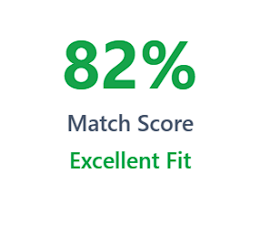 | Score | Label |
| - | - |
| ≥ 80% | Excellent Fit |
| ≥ 65% | Strong Fit |
| ≥ 50% | Possible |
| ≥ 35% | Weak |
| \< 35% | Poor |
| No score | Not Rated |
The Fit Ring on each card fills proportionally to each dimension's weight, so the total filled arc equals the final score. When the AI's confidence is low, the ring is drawn dashed and faded — a visual cue that the AI itself was less certain, not a rendering bug.
### Needs review and Low fit badges
* **Needs review** — the AI couldn't confirm fit from the available attachments. You'll see one of two explanatory messages depending on why the attachments fell short.
* **Low fit** — shown deliberately rather than hidden (when your [Recommendation volume](/features/recommendations#recommendation-volume) includes low-fit results). The card explains what's blocking it: *"Shown because it is related to your work, scored low because of this: \[reason]."*
### Learned insights: what thumbs feedback actually changes
Thumbs feedback doesn't retrain anything in real time. A **nightly digest** reads feedback submitted since the last run and turns it into a capped list of learned patterns that the AI takes into account in future qualification, scoring, and retrieval. You can see and remove these patterns under **Learned From Your Feedback** in the Memories tab of your [Company Profile](/features/business-profile#profile-tabs).
Insights can only **move a score** — they are explicitly forbidden from causing a reject. A thumbs-down never removes an entire category of work from your feed.
Two details worth knowing:
* **Feedback is shared across your org.** Insights are profile-scoped, not per-teammate, so a thumbs-down from any team member trains the same profile everyone else sees.
* **The pattern list is capped.** Once it's full, a new pattern can only get added by displacing an existing one. If your recent feedback doesn't seem to be changing anything, this is often why — it's competing with older patterns for a limited number of slots.
## Stage 4: Delivery
Every scored result is saved, whether or not it gets emailed.
### The email floor
Only recommendations scoring **50% or higher** ("Possible" or better) are included in the email digest. Anything below that threshold is visible in-app but is **never emailed** — this is by design, not a delivery failure.
### Manual refresh: 5 per day, shared across your org
| Score | Label |
| - | - |
| ≥ 80% | Excellent Fit |
| ≥ 65% | Strong Fit |
| ≥ 50% | Possible |
| ≥ 35% | Weak |
| \< 35% | Poor |
| No score | Not Rated |
The Fit Ring on each card fills proportionally to each dimension's weight, so the total filled arc equals the final score. When the AI's confidence is low, the ring is drawn dashed and faded — a visual cue that the AI itself was less certain, not a rendering bug.
### Needs review and Low fit badges
* **Needs review** — the AI couldn't confirm fit from the available attachments. You'll see one of two explanatory messages depending on why the attachments fell short.
* **Low fit** — shown deliberately rather than hidden (when your [Recommendation volume](/features/recommendations#recommendation-volume) includes low-fit results). The card explains what's blocking it: *"Shown because it is related to your work, scored low because of this: \[reason]."*
### Learned insights: what thumbs feedback actually changes
Thumbs feedback doesn't retrain anything in real time. A **nightly digest** reads feedback submitted since the last run and turns it into a capped list of learned patterns that the AI takes into account in future qualification, scoring, and retrieval. You can see and remove these patterns under **Learned From Your Feedback** in the Memories tab of your [Company Profile](/features/business-profile#profile-tabs).
Insights can only **move a score** — they are explicitly forbidden from causing a reject. A thumbs-down never removes an entire category of work from your feed.
Two details worth knowing:
* **Feedback is shared across your org.** Insights are profile-scoped, not per-teammate, so a thumbs-down from any team member trains the same profile everyone else sees.
* **The pattern list is capped.** Once it's full, a new pattern can only get added by displacing an existing one. If your recent feedback doesn't seem to be changing anything, this is often why — it's competing with older patterns for a limited number of slots.
## Stage 4: Delivery
Every scored result is saved, whether or not it gets emailed.
### The email floor
Only recommendations scoring **50% or higher** ("Possible" or better) are included in the email digest. Anything below that threshold is visible in-app but is **never emailed** — this is by design, not a delivery failure.
### Manual refresh: 5 per day, shared across your org
 Clicking **Refresh Recommendations** triggers a new run, capped at **5 manual refreshes per UTC day**. The cap is **shared across your organization**, not per person — a refresh by any teammate counts against the same daily pool. Hit the cap and the button shows an error; start a refresh while one is already running and you're asked to wait.
A manual refresh only regenerates **profile-based** recommendations (what you see under the **Profile** tab, and the profile-based portion of **All**). It does **not** touch **Saved Searches**-tab recommendations — those come from your saved searches' scheduled email alerts instead. Refreshing won't change them; see [AI Qualification](/features/qualification) for how that pipeline runs.
Recommendations also regenerate automatically once a day as part of a scheduled batch that emails the digest — there's no way to see or change the time this runs.
### The three dismissed surfaces
Clicking **Refresh Recommendations** triggers a new run, capped at **5 manual refreshes per UTC day**. The cap is **shared across your organization**, not per person — a refresh by any teammate counts against the same daily pool. Hit the cap and the button shows an error; start a refresh while one is already running and you're asked to wait.
A manual refresh only regenerates **profile-based** recommendations (what you see under the **Profile** tab, and the profile-based portion of **All**). It does **not** touch **Saved Searches**-tab recommendations — those come from your saved searches' scheduled email alerts instead. Refreshing won't change them; see [AI Qualification](/features/qualification) for how that pipeline runs.
Recommendations also regenerate automatically once a day as part of a scheduled batch that emails the digest — there's no way to see or change the time this runs.
### The three dismissed surfaces
 SamSearch has three places an opportunity can land after you say "not this one," and they don't share a Restore action:
| Surface | What lands here | Restore available? |
| - | - | - |
| **Archive → Dismissed** | Recommendations you dismissed (thumbs-down or the **Dismiss** button) | No |
| **Archive → Journey Hub** | Recommendations you turned into a Journey (thumbs-up) | Not applicable — it's now a Journey |
| **Dismissed Opportunities** (reached from [Search](/features/search#dismissing-opportunities), not Recommendations) | Opportunities marked **Not Interested** from a manual search | **Yes** |
If you dismissed something from your Recommendations feed and are looking for a way to bring it back, it isn't there — only opportunities dismissed from a manual Search have a Restore option.
### Feedback reasons
Both thumbs buttons open a dialog that requires at least one reason:
* **Thumbs up** (adds the opportunity to Journey Hub): strong capability match, right location, right NAICS/certifications, right budget, agency relationship, realistic timeline, or other.
* **Thumbs down** (dismisses the opportunity): wrong industry/NAICS, wrong location, budget mismatch, wrong contract type, capability mismatch, timeline too short, or other.
The plain **Dismiss** (✕) button on a card removes the opportunity with **no reason required**, and doesn't feed the learned-insights digest.
## Why am I not seeing recommendations?
Check your Company Profile for the [signal gate](#stage-1-retrieval): you need at least one of positive keywords, NAICS codes, PSC codes, or a 40+ character business description. Without one of these, generation is skipped silently and the run still reports success.
Keyword matching is a [literal substring match](#keywords-are-literal-substring-matches), not semantic. Check whether your exact phrase appears in the opportunity text — a close synonym or reordered phrase won't match.
Code trust [depends on the source](#naics-and-psc-codes-are-trusted-differently-by-source). On SLED, Canada, and DIBBS, NAICS is SamSearch's own inferred guess — a mismatch is ignored, not penalized. Codes also act mostly as a ranking boost rather than a strict filter.
If your Company Profile has no **Operating Region** set, location is left out of qualification entirely — the AI isn't considering geography for your profile at all. Add an operating region to change this.
This is almost always the [qualification cache](#the-qualification-cache-why-recommendations-stop-changing). Every previously decided opportunity is skipped in future runs. Opportunities with no response deadline are excluded permanently, since their cached decision never expires.
[Learned insights](#learned-insights-what-thumbs-feedback-actually-changes) can only move a score, never cause a reject — a thumbs-down can't remove a whole category of work. The insight list is also capped; if it's full, your recent feedback may need to displace an older pattern before it has any visible effect.
Only results scoring **50% or higher** are included in the email digest — this is the [email floor](#the-email-floor). Lower-scoring results are visible on the page but intentionally never emailed.
Manual refresh is capped at [5 runs per UTC day, shared across your whole org](#manual-refresh-5-per-day-shared-across-your-org) — one teammate's refresh counts against everyone's quota. If a run is already in progress, you'll see a different message asking you to wait for it to finish.
Manual refresh only regenerates **profile-based** recommendations. Saved Searches-tab results come from each saved search's scheduled email alert instead — see [AI Qualification](/features/qualification).
**Needs review** means the AI couldn't confirm fit from the available attachments. **Low fit** means the opportunity is related to your work but scored low for a stated reason — shown deliberately rather than hidden. Both are explained under [Needs review and Low fit badges](#needs-review-and-low-fit-badges).
Check which of the [three dismissed surfaces](#the-three-dismissed-surfaces) it's in. Only opportunities dismissed from a manual Search (the **Dismissed Opportunities** page) can be restored — recommendations dismissed from the Recommendations page cannot.
That's the [qualification banner](#the-not-recommended-banner-on-contract-pages) — it only appears when the opportunity was rejected or marked low fit and there's no live recommendation for it. It explains the decision without adding the opportunity back to your feed.
Return to the page reference — tabs, filters, and available actions.
SamSearch has three places an opportunity can land after you say "not this one," and they don't share a Restore action:
| Surface | What lands here | Restore available? |
| - | - | - |
| **Archive → Dismissed** | Recommendations you dismissed (thumbs-down or the **Dismiss** button) | No |
| **Archive → Journey Hub** | Recommendations you turned into a Journey (thumbs-up) | Not applicable — it's now a Journey |
| **Dismissed Opportunities** (reached from [Search](/features/search#dismissing-opportunities), not Recommendations) | Opportunities marked **Not Interested** from a manual search | **Yes** |
If you dismissed something from your Recommendations feed and are looking for a way to bring it back, it isn't there — only opportunities dismissed from a manual Search have a Restore option.
### Feedback reasons
Both thumbs buttons open a dialog that requires at least one reason:
* **Thumbs up** (adds the opportunity to Journey Hub): strong capability match, right location, right NAICS/certifications, right budget, agency relationship, realistic timeline, or other.
* **Thumbs down** (dismisses the opportunity): wrong industry/NAICS, wrong location, budget mismatch, wrong contract type, capability mismatch, timeline too short, or other.
The plain **Dismiss** (✕) button on a card removes the opportunity with **no reason required**, and doesn't feed the learned-insights digest.
## Why am I not seeing recommendations?
Check your Company Profile for the [signal gate](#stage-1-retrieval): you need at least one of positive keywords, NAICS codes, PSC codes, or a 40+ character business description. Without one of these, generation is skipped silently and the run still reports success.
Keyword matching is a [literal substring match](#keywords-are-literal-substring-matches), not semantic. Check whether your exact phrase appears in the opportunity text — a close synonym or reordered phrase won't match.
Code trust [depends on the source](#naics-and-psc-codes-are-trusted-differently-by-source). On SLED, Canada, and DIBBS, NAICS is SamSearch's own inferred guess — a mismatch is ignored, not penalized. Codes also act mostly as a ranking boost rather than a strict filter.
If your Company Profile has no **Operating Region** set, location is left out of qualification entirely — the AI isn't considering geography for your profile at all. Add an operating region to change this.
This is almost always the [qualification cache](#the-qualification-cache-why-recommendations-stop-changing). Every previously decided opportunity is skipped in future runs. Opportunities with no response deadline are excluded permanently, since their cached decision never expires.
[Learned insights](#learned-insights-what-thumbs-feedback-actually-changes) can only move a score, never cause a reject — a thumbs-down can't remove a whole category of work. The insight list is also capped; if it's full, your recent feedback may need to displace an older pattern before it has any visible effect.
Only results scoring **50% or higher** are included in the email digest — this is the [email floor](#the-email-floor). Lower-scoring results are visible on the page but intentionally never emailed.
Manual refresh is capped at [5 runs per UTC day, shared across your whole org](#manual-refresh-5-per-day-shared-across-your-org) — one teammate's refresh counts against everyone's quota. If a run is already in progress, you'll see a different message asking you to wait for it to finish.
Manual refresh only regenerates **profile-based** recommendations. Saved Searches-tab results come from each saved search's scheduled email alert instead — see [AI Qualification](/features/qualification).
**Needs review** means the AI couldn't confirm fit from the available attachments. **Low fit** means the opportunity is related to your work but scored low for a stated reason — shown deliberately rather than hidden. Both are explained under [Needs review and Low fit badges](#needs-review-and-low-fit-badges).
Check which of the [three dismissed surfaces](#the-three-dismissed-surfaces) it's in. Only opportunities dismissed from a manual Search (the **Dismissed Opportunities** page) can be restored — recommendations dismissed from the Recommendations page cannot.
That's the [qualification banner](#the-not-recommended-banner-on-contract-pages) — it only appears when the opportunity was rejected or marked low fit and there's no live recommendation for it. It explains the decision without adding the opportunity back to your feed.
Return to the page reference — tabs, filters, and available actions.