> ## Documentation Index
> Fetch the complete documentation index at: https://docs.samsearch.co/llms.txt
> Use this file to discover all available pages before exploring further.
# Integrations
> Connect SamSearch to your CRM, cloud storage, messaging tools, and government procurement portals
Integrations are found under **Account → Integrations** in the left sidebar.
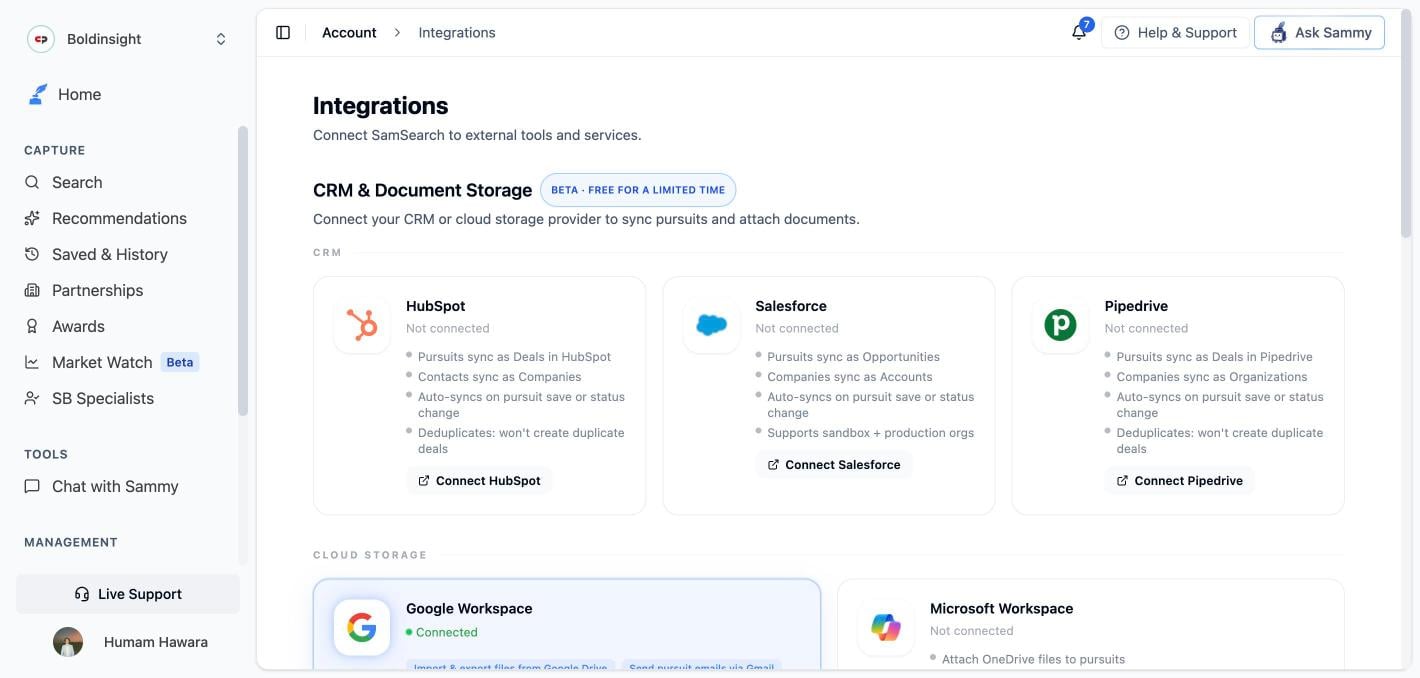 ## CRM & Document Storage
CRM and cloud storage integrations are currently in **Beta — free for a limited time**.
Connect your CRM or cloud storage provider to sync pursuits and attach documents directly within SamSearch.
### CRM
* Pursuits sync as **Deals** in HubSpot
* Contacts sync as **Companies**
* Auto-syncs on pursuit save or status change
* Deduplicates — won't create duplicate deals
* Can trigger only on opportunities above a score threshold (e.g. 80+)
* Pursuits sync as **Opportunities**
* Companies sync as **Accounts**
* Auto-syncs on pursuit save or status change
* Supports sandbox + production orgs
* Pursuits sync as **Deals** in Pipedrive
* Companies sync as **Organizations**
* Auto-syncs on pursuit save or status change
* Deduplicates — won't create duplicate deals
To connect, click the **Connect** button on the integration card. You will be redirected to authenticate with your CRM account.
### Cloud Storage
* **Import** files from Google Drive into SamSearch (one-way — Drive to SamSearch)
* Send pursuit emails via **Gmail**
* Sync due dates to **Google Calendar**
* Works with shared drives
* Attach **OneDrive** files to pursuits
* Send pursuit emails via **Outlook**
* Sync due dates to **Outlook Calendar**
* Reuses your Microsoft 365 login — no extra sign-in
Google Workspace and Microsoft Workspace are mutually exclusive — disconnect one before connecting the other.
Google Drive integration is **one-way**: files flow from Drive into SamSearch. Exporting SamSearch files back to Drive is not currently supported.
## Messaging & Notifications
* Get pursuit alerts and @mentions in Slack
* Notify your team on status changes and deadlines
* Post new AI-matched leads to a channel
* Supports Notifications, Mentions, and DMs
* Get pursuit alerts and @mentions in Teams
* Chat with Sammy directly from Teams
* Post new AI-matched leads to a channel
* **Status: Coming soon**
## Government Sources
Connect federal procurement portals to surface private RFQs directly in SamSearch.
### GSA eBuy
GSA eBuy sends **private** requests for quotes and proposals to contractors on GSA schedules. Once connected, those opportunities appear in SamSearch on the **Search** page under the **GSA eBuy** source.
See the full setup guide: [GSA eBuy Setup →](/features/gsa-ebuy-integration)
## API Access
SamSearch provides a REST API for programmatic access to search results and recommendations. The API includes a recommendations endpoint that returns AI-matched opportunities for your profile.
API access is available on **Enterprise plans** and by custom request. Contact [support@samsearch.co](mailto:support@samsearch.co) to learn more or request access.
## MCP / Claude Integration
SamSearch supports MCP (Model Context Protocol) integration, enabling connections to Claude and other AI platforms. Available on custom request — contact [support@samsearch.co](mailto:support@samsearch.co).
## CRM & Document Storage
CRM and cloud storage integrations are currently in **Beta — free for a limited time**.
Connect your CRM or cloud storage provider to sync pursuits and attach documents directly within SamSearch.
### CRM
* Pursuits sync as **Deals** in HubSpot
* Contacts sync as **Companies**
* Auto-syncs on pursuit save or status change
* Deduplicates — won't create duplicate deals
* Can trigger only on opportunities above a score threshold (e.g. 80+)
* Pursuits sync as **Opportunities**
* Companies sync as **Accounts**
* Auto-syncs on pursuit save or status change
* Supports sandbox + production orgs
* Pursuits sync as **Deals** in Pipedrive
* Companies sync as **Organizations**
* Auto-syncs on pursuit save or status change
* Deduplicates — won't create duplicate deals
To connect, click the **Connect** button on the integration card. You will be redirected to authenticate with your CRM account.
### Cloud Storage
* **Import** files from Google Drive into SamSearch (one-way — Drive to SamSearch)
* Send pursuit emails via **Gmail**
* Sync due dates to **Google Calendar**
* Works with shared drives
* Attach **OneDrive** files to pursuits
* Send pursuit emails via **Outlook**
* Sync due dates to **Outlook Calendar**
* Reuses your Microsoft 365 login — no extra sign-in
Google Workspace and Microsoft Workspace are mutually exclusive — disconnect one before connecting the other.
Google Drive integration is **one-way**: files flow from Drive into SamSearch. Exporting SamSearch files back to Drive is not currently supported.
## Messaging & Notifications
* Get pursuit alerts and @mentions in Slack
* Notify your team on status changes and deadlines
* Post new AI-matched leads to a channel
* Supports Notifications, Mentions, and DMs
* Get pursuit alerts and @mentions in Teams
* Chat with Sammy directly from Teams
* Post new AI-matched leads to a channel
* **Status: Coming soon**
## Government Sources
Connect federal procurement portals to surface private RFQs directly in SamSearch.
### GSA eBuy
GSA eBuy sends **private** requests for quotes and proposals to contractors on GSA schedules. Once connected, those opportunities appear in SamSearch on the **Search** page under the **GSA eBuy** source.
See the full setup guide: [GSA eBuy Setup →](/features/gsa-ebuy-integration)
## API Access
SamSearch provides a REST API for programmatic access to search results and recommendations. The API includes a recommendations endpoint that returns AI-matched opportunities for your profile.
API access is available on **Enterprise plans** and by custom request. Contact [support@samsearch.co](mailto:support@samsearch.co) to learn more or request access.
## MCP / Claude Integration
SamSearch supports MCP (Model Context Protocol) integration, enabling connections to Claude and other AI platforms. Available on custom request — contact [support@samsearch.co](mailto:support@samsearch.co).