> ## Documentation Index
> Fetch the complete documentation index at: https://docs.samsearch.co/llms.txt
> Use this file to discover all available pages before exploring further.
# HubSpot Setup
> Sync pursuits and contacts between SamSearch and HubSpot
Connect HubSpot to automatically sync your pursuits as Deals and your contacts as Companies — no manual data entry between SamSearch and your CRM.
You must have permission to authorize third-party app connections in your HubSpot account. If you're not a HubSpot admin, ask one to approve the connection.
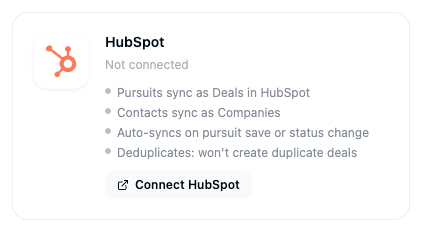 ## What this integration does
* Pursuits sync as **Deals** in HubSpot
* Contacts sync as **Companies**
* Auto-syncs on pursuit save or status change
* Deduplicates — won't create duplicate deals
* Can trigger only on opportunities above a score threshold (e.g. 80+)
***
## Part 1 — Connect HubSpot
In the left sidebar, scroll to **Account** and click **Integrations**.
Scroll to the **CRM** section. The **HubSpot** card shows your current connection status.
Click **Connect** on the HubSpot card.
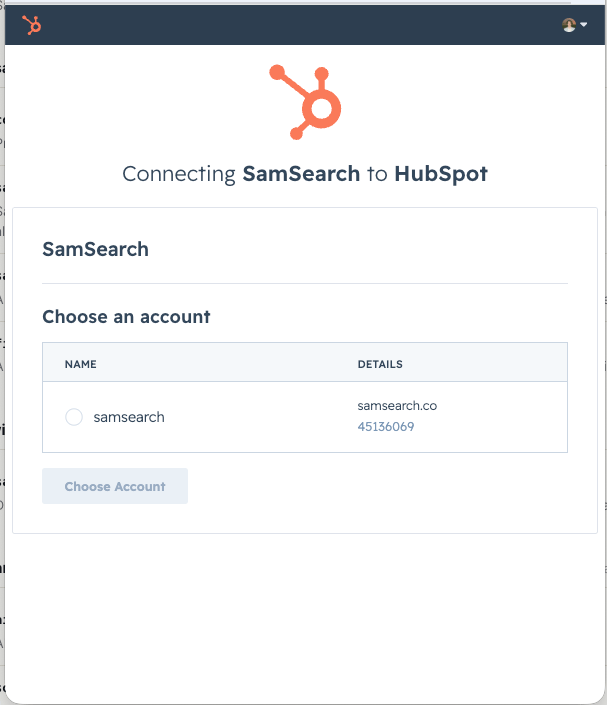
A popup opens showing the HubSpot accounts you have access to. Select the one you want to connect and click **Choose Account**.
## What this integration does
* Pursuits sync as **Deals** in HubSpot
* Contacts sync as **Companies**
* Auto-syncs on pursuit save or status change
* Deduplicates — won't create duplicate deals
* Can trigger only on opportunities above a score threshold (e.g. 80+)
***
## Part 1 — Connect HubSpot
In the left sidebar, scroll to **Account** and click **Integrations**.
Scroll to the **CRM** section. The **HubSpot** card shows your current connection status.
Click **Connect** on the HubSpot card.
A popup opens showing the HubSpot accounts you have access to. Select the one you want to connect and click **Choose Account**.
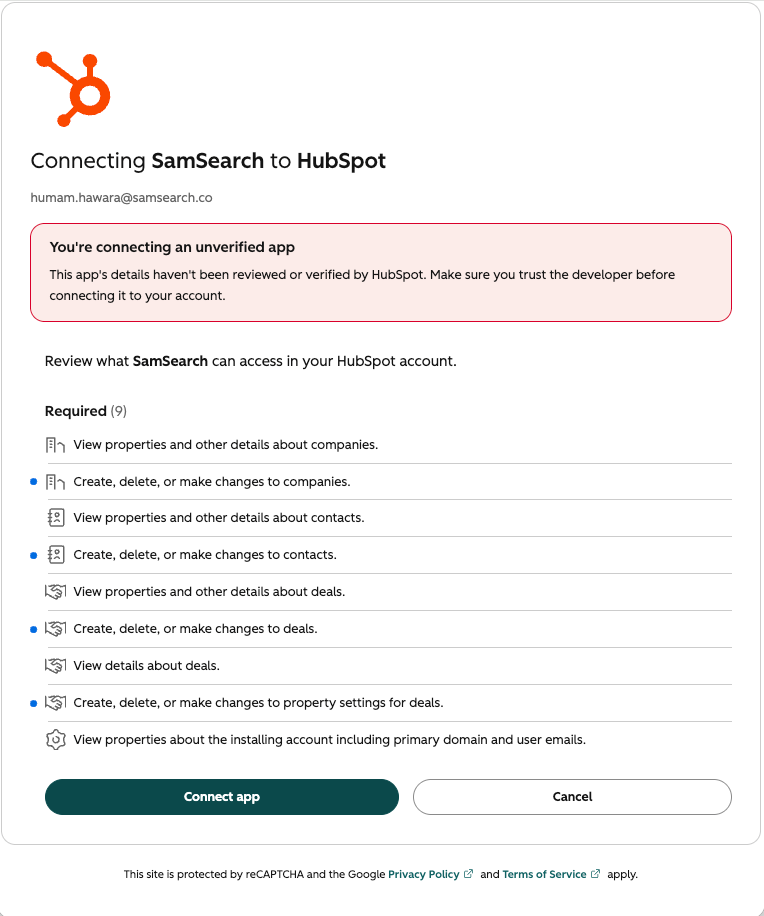
 HubSpot lists exactly what SamSearch is requesting access to — companies, contacts, and deals. Review the list and click **Connect app**.
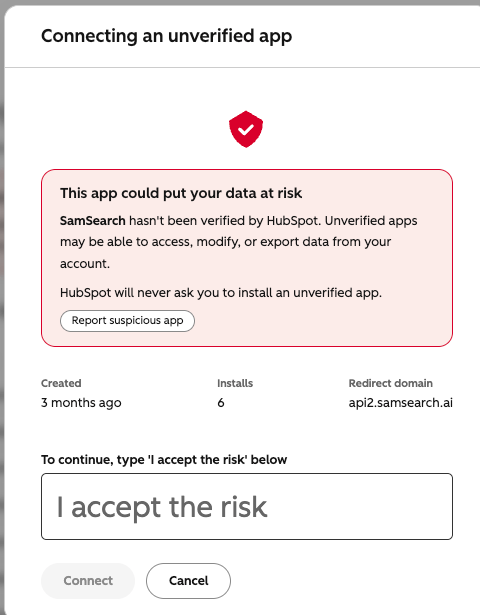
 Because SamSearch's HubSpot app hasn't gone through HubSpot's app marketplace review, HubSpot shows an "unverified app" warning. Type **I accept the risk** in the field and click **Connect** to proceed.
 The popup closes and the HubSpot card now shows **Connected**, along with the portal name.
***
## Part 2 — Optional: set a score threshold
By default, every pursuit you save syncs to HubSpot. If you only want higher-confidence opportunities to sync:
1. On the connected HubSpot card, click **Configure**.
2. Turn on **Only sync above score threshold**.
3. Set a minimum score (e.g. **80**).
4. Click **Save**.
Pursuits scoring below the threshold are not sent to HubSpot, even if saved or updated in SamSearch.
***
## Troubleshooting
**Deals aren't showing up in HubSpot**
* Confirm the integration status is **Connected** on the Integrations page.
* Check whether a score threshold is set — pursuits below it won't sync.
* Auto-sync fires on save or status change; editing unrelated fields won't trigger a new sync.
**I'm seeing duplicate deals**
* SamSearch deduplicates based on the pursuit's linked opportunity ID. If a deal was created manually in HubSpot before connecting, it won't automatically merge with the synced deal — merge it manually in HubSpot.
**The OAuth popup closes without connecting**
* Make sure pop-ups aren't blocked for SamSearch in your browser.
* Confirm you have permission to authorize apps in your HubSpot portal.
**Still stuck?** Contact [support@samsearch.co](mailto:support@samsearch.co) with your SamSearch account email and your HubSpot portal name.
The popup closes and the HubSpot card now shows **Connected**, along with the portal name.
***
## Part 2 — Optional: set a score threshold
By default, every pursuit you save syncs to HubSpot. If you only want higher-confidence opportunities to sync:
1. On the connected HubSpot card, click **Configure**.
2. Turn on **Only sync above score threshold**.
3. Set a minimum score (e.g. **80**).
4. Click **Save**.
Pursuits scoring below the threshold are not sent to HubSpot, even if saved or updated in SamSearch.
***
## Troubleshooting
**Deals aren't showing up in HubSpot**
* Confirm the integration status is **Connected** on the Integrations page.
* Check whether a score threshold is set — pursuits below it won't sync.
* Auto-sync fires on save or status change; editing unrelated fields won't trigger a new sync.
**I'm seeing duplicate deals**
* SamSearch deduplicates based on the pursuit's linked opportunity ID. If a deal was created manually in HubSpot before connecting, it won't automatically merge with the synced deal — merge it manually in HubSpot.
**The OAuth popup closes without connecting**
* Make sure pop-ups aren't blocked for SamSearch in your browser.
* Confirm you have permission to authorize apps in your HubSpot portal.
**Still stuck?** Contact [support@samsearch.co](mailto:support@samsearch.co) with your SamSearch account email and your HubSpot portal name.